
SafeCity
✨ Highlights
THE PROBLEM
Users feel unsafe when travelling alone, especially at night
Existing safety apps lack real-time, reliable information
Emergency features are often complex and difficult to use under pressure
WHAT ARE THE USER NEEDS?

Users want a simple and reliable way to stay safe while navigating the city

They seek reassurance and confidence, especially when travelling alone at night

They need real-time information about safety conditions and surroundings

They value clear and intuitive interfaces that work well under stress

They want quick and effortless access to emergency support

They expect control and transparency when sharing their location or data

✨ The Solution

Conducted
• 5 user interviews
• 46 survey responses
Key Insights
• Users often feel anxious and vulnerable, especially when travelling alone at night
• Perceived safety is influenced by lighting, crowd presence, and environment
• Users want real-time awareness of safety conditions around them
• Many users feel unprepared in emergencies and don’t know what to do
• Existing apps do not provide clear or immediate access to help
• Users prefer simple and fast interactions in high-stress situations
UNDERSTANDING THE USER
To understand how users experience safety in urban environments, we conducted both secondary research and primary user
research focusing on real-life safety concerns and behaviours.


✨ Research Summary
Our team combined secondary research, competitor analysis, surveys and interviews to understand women’s safety concerns
when travelling in London, particularly at night.
The research highlighted recurring needs around real-time safety information, safer route visibility, quick emergency actions
and greater control when travelling alone.
As the UI Designer, I used these insights to shape a clear, accessible interface and visual system that supported the team’s core
safety features.


Market Insights & Competitor Analysis
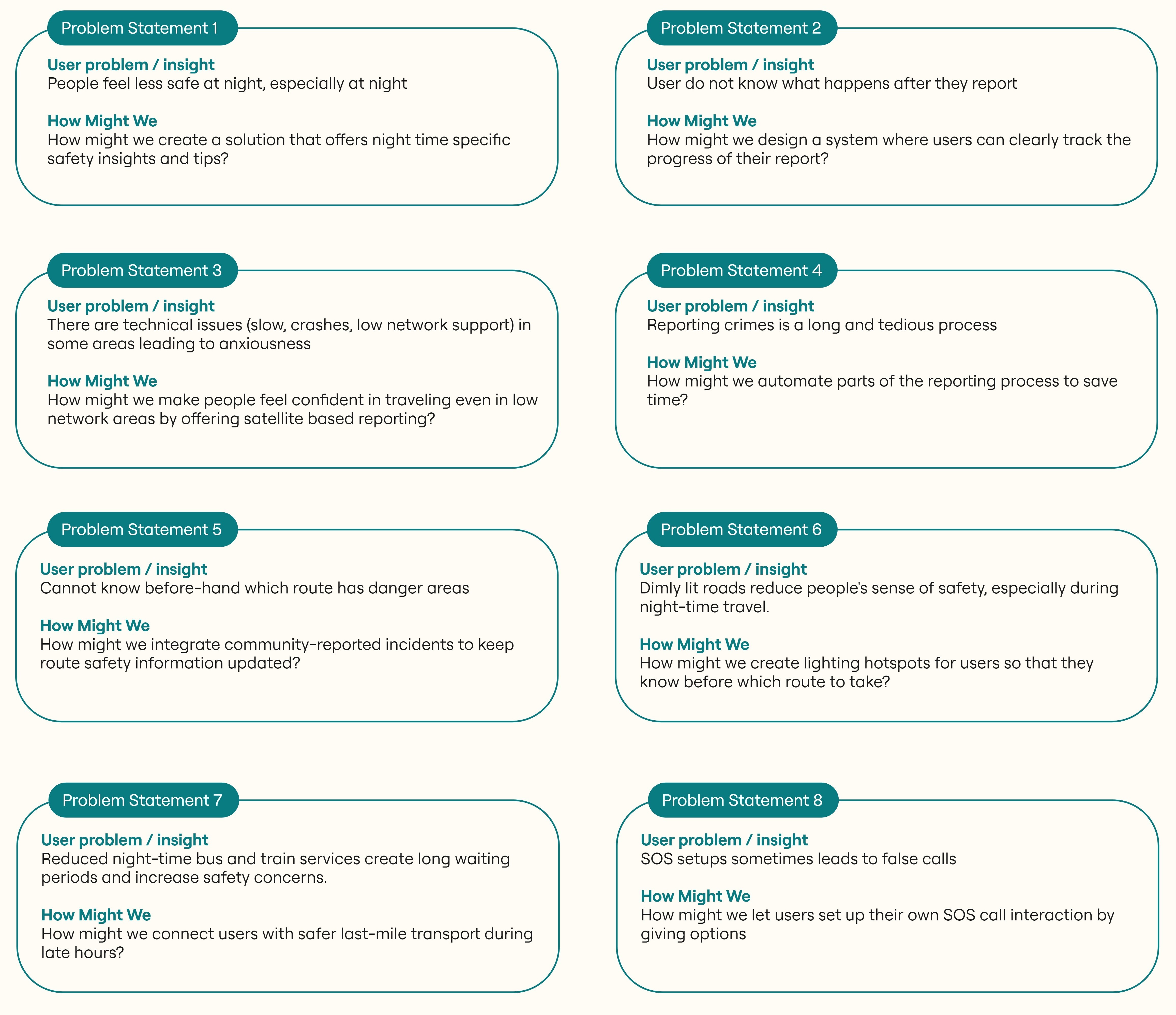
PROBLEM STATEMENT & HMW QUESTIONS
✨ Design Process
The ideation phase turned our research insights into practical safety concepts for women travelling alone in London.
Using How Might We questions and MoSCoW prioritisation, our team explored ways to provide real-time safety information,
safer route guidance, quick emergency support, and simple incident reporting.


Ideation

Empowering Women to Travel Confidently Alone

Design Brief
• Urban safety is not only about actual risk, but also users’ perception of safety
• Users experience anxiety and lack confidence when navigating unfamiliar or high-risk areas
• Current solutions do not effectively combine real-time data, emergency support, and emotional reassurance
Timeline
September 2025 — January 2026
Role
UI Designer (high-fidelity UI, visual system, interface design)
✨ Key Features
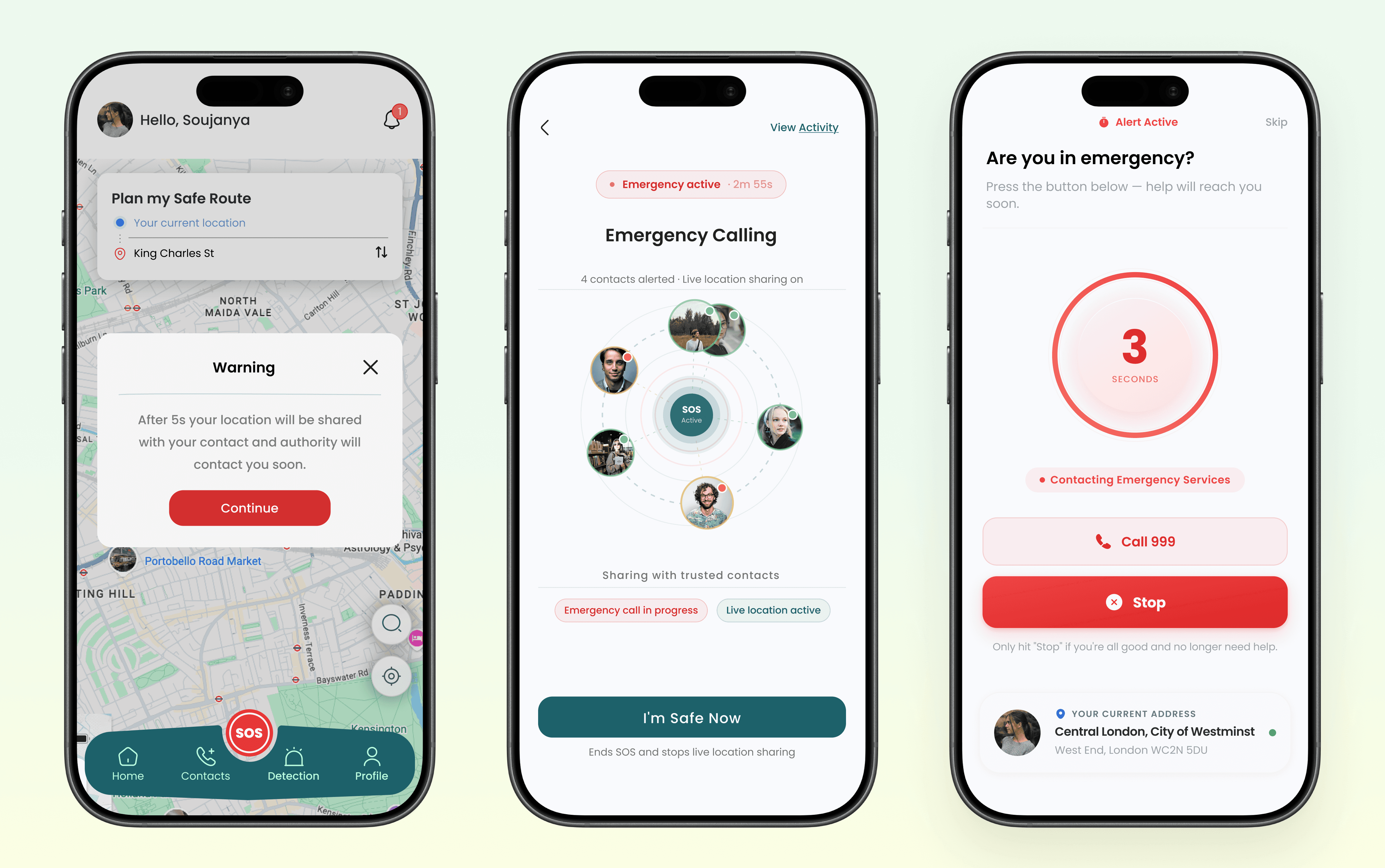
FEATURE (01) — SOS Emergency
🌱 Activate SOS quickly during critical situations
🌱 Share live location with trusted emergency contacts
🌱 Use a short countdown to prevent accidental activation
🌱 Access emergency services directly when immediate help is needed
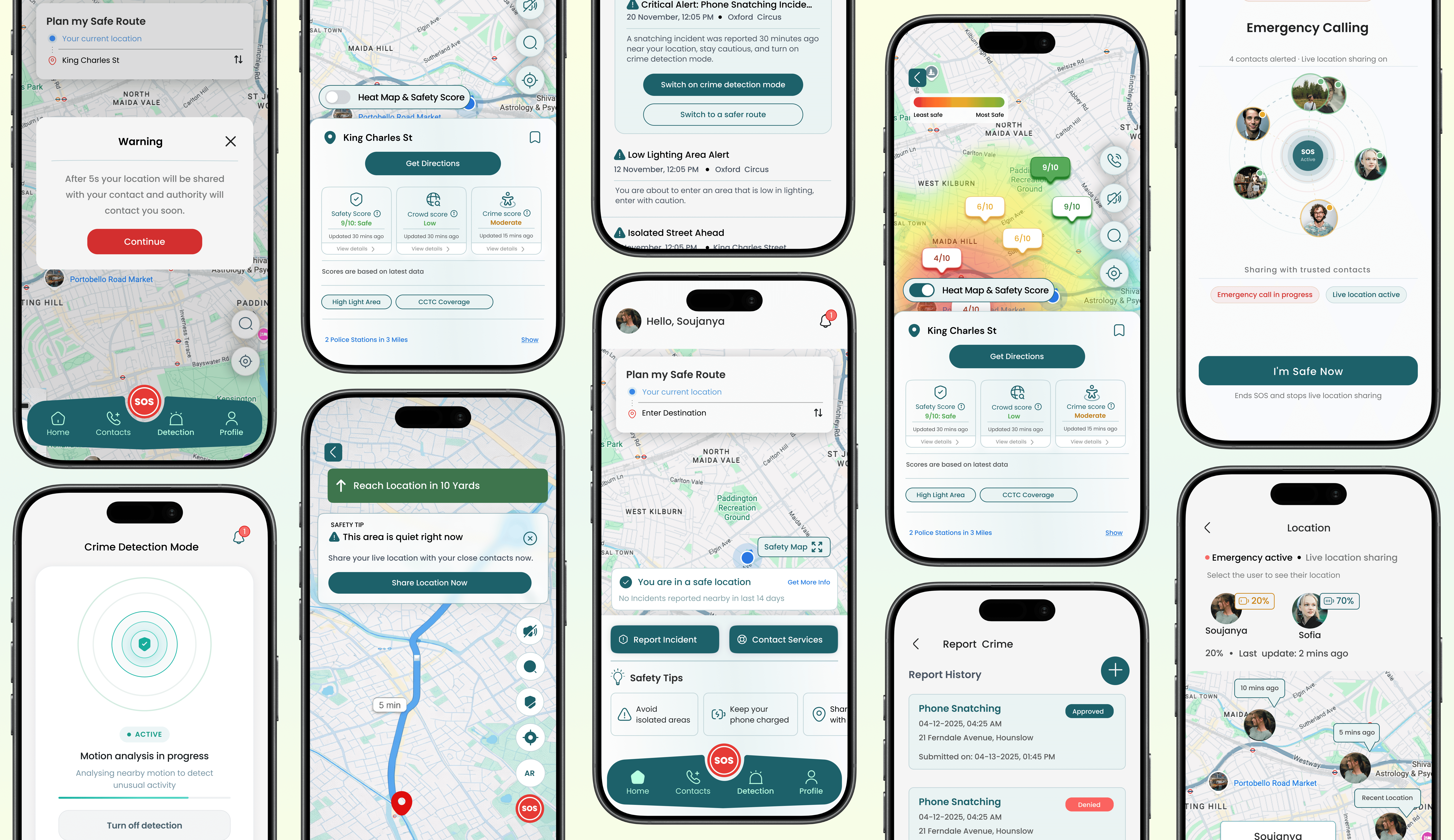
FEATURE (02) — Safe Route
🌱 Plan safer routes based on surrounding safety information
🌱 View reported incidents and risk areas directly on the map
🌱 Stay informed while travelling, especially at night
🌱 Adjust routes when potentially unsafe areas are detected


FEATURE (03) — Crime Detection
🌱 Detect unusual motion and potential phone snatching
🌱 Trigger an immediate safety alert
🌱 Automatically start secure evidence recording
🌱 Deactivate false alarms safely using a PIN
FEATURE (04) — Safety Alerts
🌱 Receive alerts when approaching reported high-risk areas
🌱 Switch quickly to Crime Detection or a safer route
🌱 Get contextual safety guidance based on the current location
🌱 Share live location with trusted contacts when needed

FEATURE (05) — Safety Map
🌱 View local Safety Scores before choosing a destination
🌱 Compare route options using safety-related criteria
🌱 Follow live route guidance to reach the destination safely
🌱 Receive contextual alerts while navigating
🌱 Use safety insights to support everyday travel decisions

FEATURE (06) — Trusted Contacts
🌱 Add and manage trusted emergency contacts
🌱 Automatically share live location when SOS is activated
🌱 Let trusted contacts follow real-time location updates
🌱 Stop sharing once the user confirms they are safe

FEATURE (07) — Crime Reporting
🌱 Report incidents with location, time, type, and relevant details
🌱 Add supporting evidence when available
🌱 Identify factors such as crowd levels, and reported crime
🌱 View previous reports and their current status

FEATURE (08) — Home & Map View
🌱 Access essential safety actions from the home screen
🌱 Explore nearby areas through an interactive map
🌱 View location-based safety scores and heat map insights
🌱 Compare safer and higher-risk areas before travelling

Design System
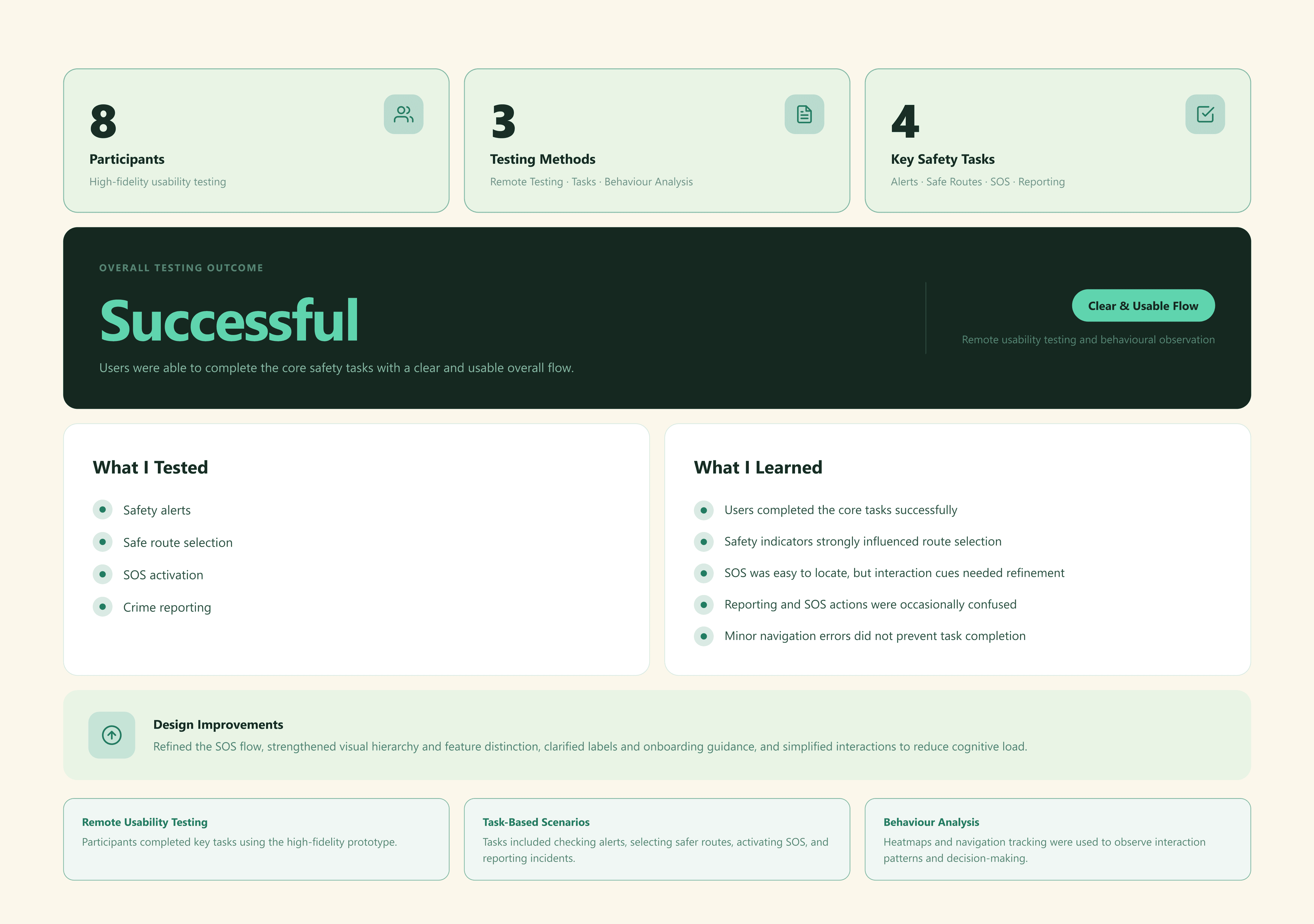
User Testing – High-Fidelity Evaluation

✨ Reflections

✨ The Challenge
WHAT ARE THE END GOALS OF SAFECITY?
Empowering Women to Travel Confidently Alone
SafeCity
Design Brief
• Urban safety is not only about actual risk, but also users’ perception of safety
• Users experience anxiety and lack confidence when navigating unfamiliar or high-risk areas
• Current solutions do not effectively combine real-time data, emergency support, and emotional reassurance
Timeline
September 2025 — January 2026
Role
UI Designer (high-fidelity UI, visual system, interface design)
Design Brief
• Urban safety is not only about actual risk, but also users’
perception of safety
• Users experience anxiety and lack confidence when navigating
unfamiliar or high-risk areas
• Current solutions do not effectively combine real-time data,
emergency support, and emotional reassurance
✨ Highlights
✨ The Challenge
THE PROBLEM
Users feel unsafe when travelling alone, especially at night
Existing safety apps lack real-time, reliable information
Emergency features are often difficult to use under pressure
WHAT ARE THE USER NEEDS?
Users want a simple and reliable way to stay safe while navigating the city
They need real-time information about safety conditions and surroundings
They want quick and effortless access to emergency support
They seek reassurance and confidence, especially when travelling alone at night
They value clear and intuitive interfaces that work well under stress
They expect control and transparency when sharing their location or data
WHAT ARE THE END GOALS OF SAFECITY?
✨ The Solution
✨ Research Summary
Market Insights & Competitor Analysis
Our team combined secondary research, competitor analysis, surveys and interviews to understand women’s safety concerns
when travelling in London, particularly at night.
The research highlighted recurring needs around real-time safety information, safer route visibility, quick emergency actions
and greater control when travelling alone.
As the UI Designer, I used these insights to shape a clear, accessible interface and visual system that supported the team’s core
safety features.
UNDERSTANDING THE USER
To understand how users experience safety in urban environments, we conducted both secondary research and primary user research focusing on real-life safety concerns and behaviours.
Conducted
• 5 user interviews
• 46 survey responses
Key Insights
• Users often feel anxious and vulnerable, especially when travelling alone at night
• Perceived safety is influenced by lighting, crowd presence, and environment
• Users want real-time awareness of safety conditions around them
• Many users feel unprepared in emergencies and don’t know what to do
• Existing apps do not provide clear or immediate access to help
• Users prefer simple and fast interactions in high-stress situations
The ideation phase turned our research insights into practical safety concepts for women travelling alone in London.
Using How Might We questions and MoSCoW prioritisation, our team explored ways to provide real-time safety information, safer route guidance, quick emergency support, and simple incident reporting.
✨ Design Process
Ideation
PROBLEM STATEMENT & HMW QUESTIONS
✨ Key Features
FEATURE (01) — SOS Emergency
🌱 Activate SOS quickly during critical situations
🌱 Share live location with trusted emergency contacts
🌱 Use a short countdown to prevent accidental activation
🌱 Access emergency services directly when immediate help is needed
FEATURE (02) — Safe Route
🌱 Plan safer routes based on surrounding safety information
🌱 View reported incidents and risk areas directly on the map
🌱 Stay informed while travelling, especially at night
🌱 Adjust routes when potentially unsafe areas are detected
FEATURE (03) — Crime Detection
🌱 Detect unusual motion and potential phone snatching
🌱 Trigger an immediate safety alert
🌱 Automatically start secure evidence recording
🌱 Deactivate false alarms safely using a PIN
FEATURE (04) — Safety Alerts
🌱 Receive alerts when approaching reported high-risk areas
🌱 Switch quickly to Crime Detection or a safer route
🌱 Get contextual safety guidance based on the current location
🌱 Share live location with trusted contacts when needed
FEATURE (05) — Safety Map
🌱 View local Safety Scores before choosing a destination
🌱 Compare route options using safety-related criteria
🌱 Follow live route guidance to reach the destination safely
🌱 Receive contextual alerts while navigating
🌱 Use safety insights to support everyday travel decisions
FEATURE (06) — Trusted Contacts
🌱 Add and manage trusted emergency contacts
🌱 Automatically share live location when SOS is activated
🌱 Let trusted contacts follow real-time location updates
🌱 Stop sharing once the user confirms they are safe
FEATURE (07) — Crime Reporting
🌱 Report incidents with location, time, type, and relevant details
🌱 Add supporting evidence when available
🌱 Identify factors such as crowd levels, and reported crime
🌱 View previous reports and their current status
FEATURE (08) — Home & Map View
🌱 Access essential safety actions from the home screen
🌱 Explore nearby areas through an interactive map
🌱 View location-based safety scores and heat map insights
🌱 Compare safer and higher-risk areas before travelling
Design System
User Testing – High-Fidelity Evaluation
✨ Reflections